Ensuring Web Accessibility Through WCAG Standards
Ensuring Web Accessibility Through WCAG Standards
The Web Content Accessibility Guidelines (WCAG) provide an international framework for making web content accessible to people with a wide range of disabilities. These guidelines help authors, designers, and developers create digital experiences that are more inclusive, usable, and flexible across devices and assistive technologies.
Web accessibility matters because digital spaces are central to education, employment, communication, and public life. When websites are inaccessible, they create barriers for people with visual, auditory, cognitive, neurological, physical, and speech disabilities.
Accessible design also improves usability for everyone by supporting clearer structure, better navigation, and more flexible ways to interact with content.
WCAG is organized around four foundational principles. Accessible content should be Perceivable, Operable, Understandable, and Robust. These principles are commonly referred to as POUR.
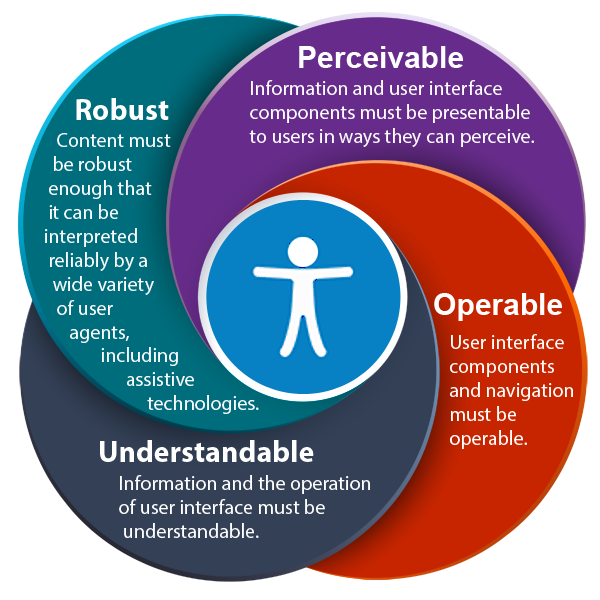
Image description: A diagram showing the four WCAG accessibility principles—Perceivable, Operable, Understandable, and Robust—arranged around an accessibility symbol to illustrate that all four principles work together to support accessible digital design.
Video: WCAG Overview
Transcript
Learning Objectives
By the end of this chapter, you should be able to:
- Explain why accessible web design is important.
- Describe the four WCAG principles: Perceivable, Operable, Understandable, and Robust.
- Identify major guideline categories within each WCAG principle.
- Distinguish among WCAG conformance levels A, AA, and AAA.
- Evaluate websites using WCAG accessibility standards.
- Use accessibility tools and testing methods.
- Design web content that supports accessibility best practices.
- Explain how accessible design benefits all users.
Key Terms
- WCAG: Web Content Accessibility Guidelines used to create accessible web content.
- POUR: The four accessibility principles: Perceivable, Operable, Understandable, and Robust.
- Conformance Level: The level of WCAG compliance: Level A, Level AA, or Level AAA.
- Assistive Technology: Tools such as screen readers or voice input that help users interact with digital content.
- Semantic HTML: HTML that communicates structure and meaning to browsers and assistive technologies.
- Accessibility Evaluation: The process of reviewing digital content for accessibility barriers.
Understanding WCAG
The Web Content Accessibility Guidelines were developed by the World Wide Web Consortium through the Web Accessibility Initiative (WAI). WCAG provides standards that help ensure web content can be accessed by people with a wide range of disabilities.
The Evolution of WCAG
- WCAG 1.0 (1999): The first accessibility guidelines.
- WCAG 2.0 (2008): Introduced technology-neutral accessibility criteria.
- WCAG 2.1 (2018): Expanded guidance for mobile accessibility, low vision, and cognitive disabilities.
WCAG Principles Explained
Perceivable
- Provide alt text for images
- Provide captions and transcripts for multimedia
- Ensure sufficient color contrast
- Structure content using headings
Operable
- Ensure keyboard navigation
- Provide clear navigation structure
- Avoid flashing content that can trigger seizures
- Give users enough time to interact with content
Understandable
- Use clear language
- Ensure predictable navigation
- Provide clear instructions and error messages
Robust
- Use semantic HTML
- Ensure compatibility with assistive technologies
WCAG Levels of Conformance
| Level | Description | Examples |
|---|---|---|
| Level A | Basic accessibility requirements addressing critical barriers. | Alt text for images, keyboard access. |
| Level AA | Addresses major usability barriers and is the most commonly adopted accessibility target. | Color contrast requirements, resizable text. |
| Level AAA | Advanced accessibility improvements that support additional user needs. | Enhanced contrast and extended accessibility support. |
Evaluating Website Accessibility
Steps for Accessibility Evaluation
- Review WCAG principles and relevant success criteria.
- Run automated accessibility testing tools.
- Conduct manual testing using keyboard navigation.
- Test with screen readers and assistive technologies.
- Document issues and prioritize improvements.
- Fix issues and re-test.
Accessibility Testing Tools
- WAVE: Browser-based accessibility evaluation tool.
- axe DevTools: Developer accessibility testing tools.
- NVDA: Free screen reader for Windows.
- VoiceOver: Built-in screen reader on Apple devices.
Best Practices for Accessible Web Design
- Use semantic HTML structure.
- Ensure full keyboard accessibility.
- Provide text alternatives for images and media.
- Check color contrast for readability.
- Design responsive content for multiple devices.
Chapter Summary
WCAG provides internationally recognized guidelines for building accessible digital experiences. By following the four principles—Perceivable, Operable, Understandable, and Robust—developers and content creators can reduce barriers and create inclusive online environments.
Key Takeaways
- WCAG defines global standards for web accessibility.
- The four core accessibility principles are known as POUR.
- Level AA is the most commonly used accessibility target.
- Accessibility evaluation requires both automated and manual testing.
- Accessible design improves usability for everyone.
Review Questions
- What are the four WCAG accessibility principles?
- What is the difference between Level A, AA, and AAA?
- Why is Level AA commonly used as the accessibility target?
- Name two accessibility testing tools.
- How does accessible design benefit all users?
Practice Activity
Select a website and evaluate it using WCAG principles.
- Identify three accessibility barriers.
- Determine which WCAG principle they relate to.
- Suggest improvements.
Further Reading
Licenses and Attribution
CC Licensed Content, Original
This educational material includes AI-generated content from ChatGPT by OpenAI. The original content created by Josh Hill, Neida Abraham, and Emiliana Olavarrieta from Hillsborough College is licensed under a Creative Commons Attribution-NonCommercial 4.0 International License (CC BY-NC 4.0).
All images in this textbook generated with DALL·E are licensed under the terms provided by OpenAI, allowing their use, modification, and distribution with appropriate attribution.
Other Licensed Content
Web Content Accessibility Guidelines (WCAG) Overview
Accessible.org (The ADA Book)
License: Standard YouTube License.