Open Educational Resources, AI, & Digital Accessibility
Open Educational Resources, AI, and Digital Accessibility
Digital learning environments increasingly rely on Open Educational Resources (OER) and emerging technologies such as artificial intelligence (AI) to support teaching and learning. These tools make it easier to create, adapt, and distribute educational materials, but they also introduce new accessibility responsibilities.
Opportunities to engage in this work can be found at colleges and universities around the world. One example is the Hillsborough College AI OER Creation Program.
Accessible design ensures that learning materials can be used by all learners, including students who rely on assistive technologies such as screen readers, keyboard navigation, captions, or alternative input devices. When accessibility is incorporated from the beginning of the design process, digital learning materials become more inclusive and usable for everyone.
Learning Objectives
- Explain how accessibility applies to digital learning materials.
- Describe how Open Educational Resources expand educational access.
- Identify accessibility considerations when using AI to create educational content.
- Apply WCAG accessibility principles when designing OER.
- Describe a workflow that integrates accessibility into digital publishing.
Key Terms
- Open Educational Resources (OER): Teaching and learning materials that are freely available and openly licensed for reuse, revision, and redistribution.
- Digital accessibility: The practice of designing digital content so it can be used by people with a wide range of abilities and assistive technologies.
- Artificial intelligence (AI): Technology that can assist with generating, revising, and supporting educational content creation.
- WCAG: The Web Content Accessibility Guidelines, an international framework for creating accessible digital content.
- Assistive technology: Tools such as screen readers, voice recognition software, and captioning systems that help users access digital materials.
Accessibility in Digital Learning Environments
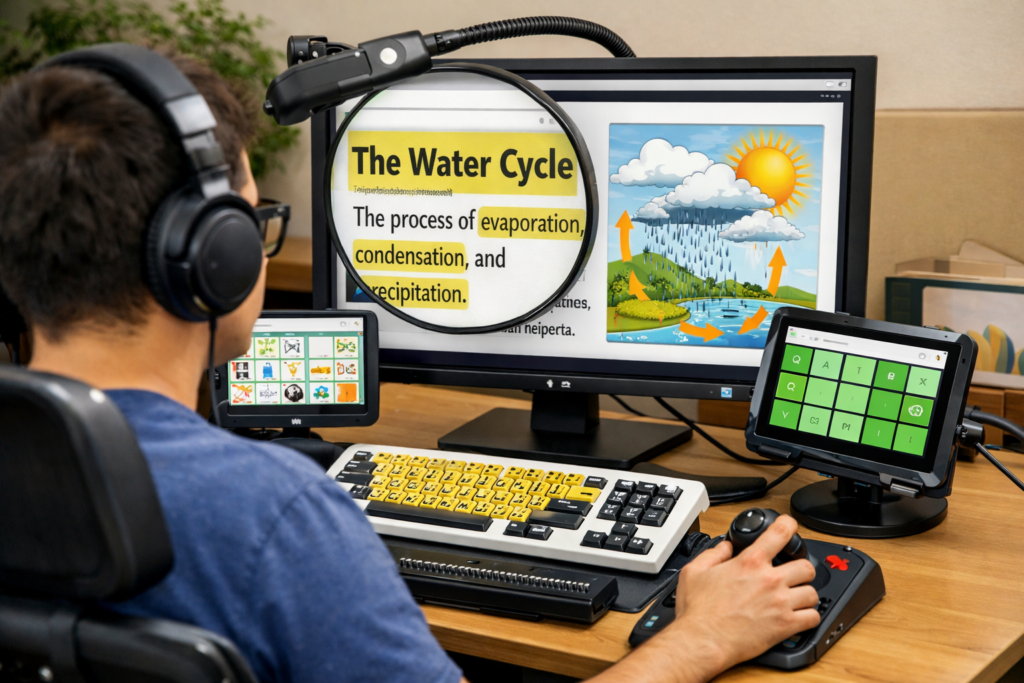
Digital accessibility ensures that websites, applications, and learning resources can be used by individuals with diverse abilities. Students may interact with digital learning materials using assistive technologies including:
- Screen readers
- Voice recognition software
- Keyboard-only navigation
- Screen magnification
- Captioned multimedia players
Accessibility Check
Accessible digital content supports multiple ways of perceiving, navigating, and interacting with information.
Open Educational Resources and Accessibility
Open Educational Resources are teaching and learning materials that are freely available and openly licensed. Because OER can be reused, adapted, and redistributed, they help reduce financial barriers to education.
However, open access does not automatically guarantee accessibility. OER must still be designed according to accessibility best practices in order to support all learners.
Accessible OER design typically includes:
- Structured heading hierarchy
- Alternative text descriptions for images
- Captions and transcripts for multimedia
- Readable fonts and sufficient color contrast
- Clear, descriptive hyperlinks
AI-Assisted Content Creation

Artificial intelligence tools can assist educators in developing learning materials more efficiently. AI systems can generate outlines, draft instructional explanations, create practice questions, and suggest visuals to support complex concepts.
AI tools can also assist with accessibility tasks such as generating image descriptions, creating transcripts, or identifying potential accessibility issues in digital documents.
Practical Tip
AI can accelerate the drafting process, but faculty expertise remains essential. Review all AI-generated content for accuracy, bias, and accessibility before publication.
Accessible OER Development Workflow
Many institutions follow a structured workflow to ensure high-quality, accessible educational materials.
- AI Draft: Generate structured outlines and draft content.
- Faculty Review: Verify accuracy, clarity, and pedagogy.
- Licensing: Apply Creative Commons licenses and attribution.
- Accessibility Audit: Review content for WCAG compliance.
- Publish: Release materials through platforms such as Pressbooks.
Accessibility Standards: WCAG
The Web Content Accessibility Guidelines (WCAG) provide a framework for designing accessible digital content. These guidelines are organized around four core principles.
| Principle | Description |
|---|---|
| Perceivable | Content must be presented in ways users can perceive, such as text alternatives for images and captions for media. |
| Operable | Interface components must be usable through keyboard navigation and assistive technology. |
| Understandable | Information and navigation should be clear, consistent, and predictable. |
| Robust | Content must remain compatible with current and future assistive technologies. |
Video: Creating Accessible Open Educational Resources
The following video introduces accessible OER design for student authors and educators.
Media Access
Provide captions and a transcript for embedded videos whenever possible. Also include a meaningful link to the video for users who prefer to open it in a new tab.
Accessibility Checklist
| Accessibility Feature | Example Implementation |
|---|---|
| Heading Structure | Use hierarchical headings in order, such as H2, H3, and H4. |
| Alternative Text | Provide meaningful descriptions for images. |
| Captions | Add captions and transcripts to multimedia. |
| Link Text | Use descriptive links instead of generic text. |
| Color Contrast | Ensure sufficient contrast between text and background. |
Chapter Summary
OER, AI, and accessibility are closely connected in modern digital publishing. OER can expand educational access, AI can support content development, and accessibility ensures that materials remain usable for all learners. These benefits are strongest when accessibility is integrated into the workflow from the beginning rather than added later.
Key Takeaways
- OER expand access to education by reducing cost barriers.
- Accessibility ensures digital learning materials can be used by all learners.
- AI tools can assist in drafting and improving educational content.
- Faculty oversight remains essential for accuracy and accessibility.
- Accessibility should be integrated throughout the digital publishing workflow.
Review Questions
- What are Open Educational Resources?
- Why is accessibility important in digital learning environments?
- How can AI assist educators in creating OER?
- What are the four WCAG accessibility principles?
- What steps are included in an accessible OER development workflow?
Practice Activity
Choose a digital learning resource such as a webpage, presentation, or digital textbook chapter. Evaluate the resource using the accessibility checklist in this chapter. Identify at least three improvements that could make the resource more accessible.
Licenses and Attribution
CC Licensed Content, Original
This educational material includes AI-generated content from ChatGPT by OpenAI. The original content created by Josh Hill, Neida Abraham, and Emiliana Olavarrieta from Hillsborough College is licensed under a Creative Commons Attribution-NonCommercial 4.0 International License (CC BY-NC 4.0).
All images in this textbook generated with DALL·E are licensed under the terms provided by OpenAI, allowing their use, modification, and distribution with appropriate attribution.
Other Licensed Content
Creating Accessible OER for Student Authors
Abbey Elder
License: CC BY 4.0.